
Introduction
Large language models can generate impressive answers, but they do not automatically know everything about a company’s private or constantly changing information.
Business data is often distributed across:
- PDFs
- Documents
- Websites
- Databases
- Product catalogs
- Internal knowledge bases
- Customer records
- Policies
- Technical documentation
This creates an important challenge.
How can an AI system generate useful answers using a company’s own information without requiring the model to be retrained every time the data changes?
One widely used approach is Retrieval-Augmented Generation, or RAG.
RAG connects an AI model with an external knowledge source. Instead of relying only on information contained within the model, the system retrieves relevant information and provides it as context to the language model before generating a response.
This makes RAG architecture particularly useful for enterprise AI applications where accuracy, domain-specific information, and access to current business knowledge are important.
Quick Answer
RAG architecture is an AI system design that combines information retrieval with large language model generation.
A typical RAG pipeline works like this:
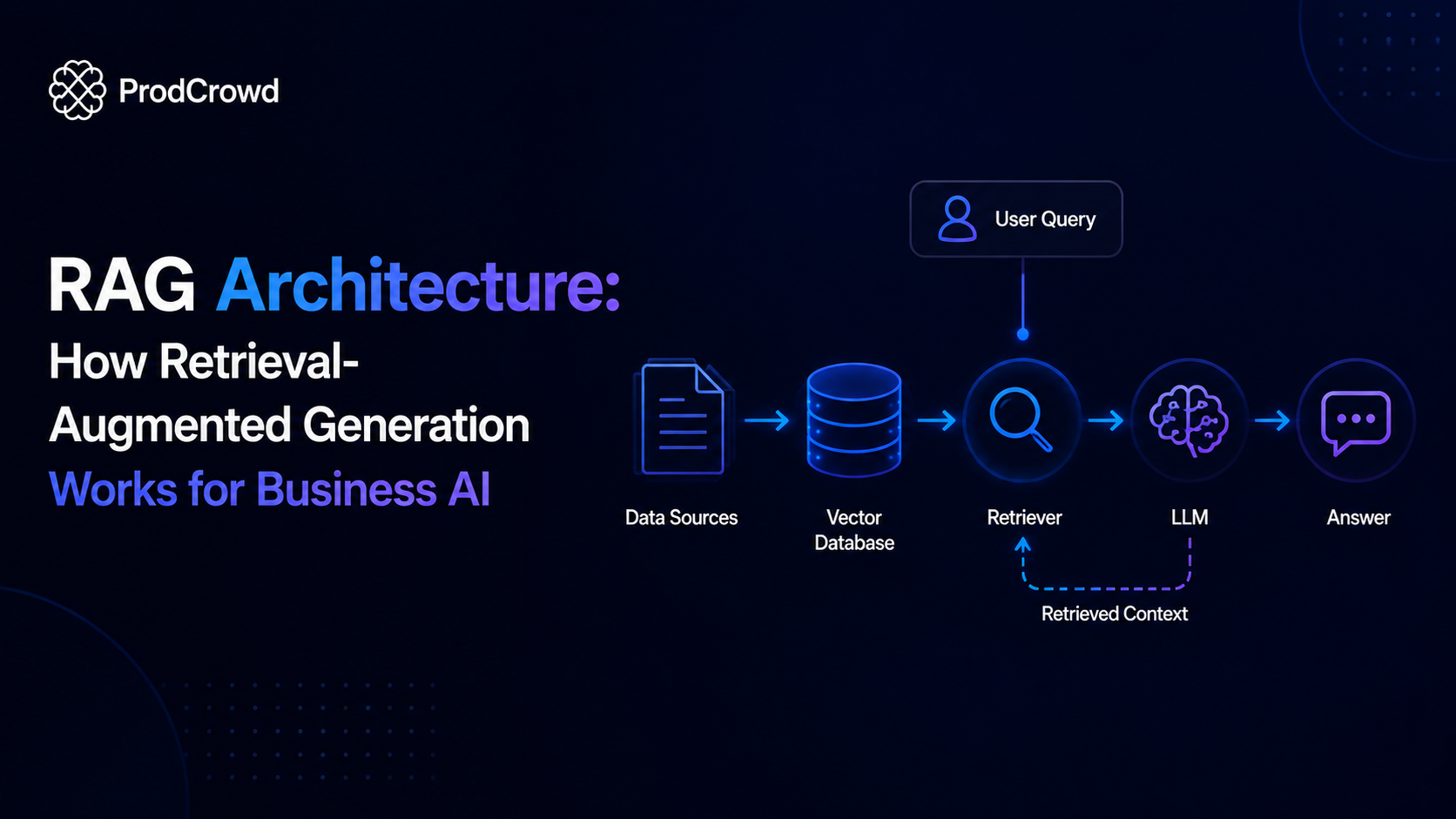
Documents → Chunking → Embeddings → Vector Database → User Query → Retrieval → Context → LLM → Answer
The retrieval layer finds relevant information from a company’s knowledge base, and the language model uses that information to generate a contextual response.
What Is RAG?
Quick Answer
Retrieval-Augmented Generation (RAG) is a technique that allows a language model to retrieve relevant external information and use that information when generating an answer.
A traditional LLM workflow can be represented as:
User Question → LLM → Answer
A RAG workflow adds a retrieval layer:
User Question → Retriever → Relevant Knowledge → LLM → Answer
This means the model does not have to rely exclusively on its pretrained knowledge.
Instead, the application can provide relevant information from an external knowledge base at the time of the query.
Why Is RAG Important for Business AI?
Quick Answer
RAG is useful for businesses because company information frequently changes and may not be included in a general-purpose AI model’s training data.
Consider a company with thousands of internal documents.
Employees may ask:
“What is our current enterprise refund policy?”
A general-purpose language model may not know the company’s internal policy.
A RAG system can search the organization’s approved documentation, retrieve the relevant section, and provide that information to the model as context.
This creates a workflow where:
Company Knowledge → Retrieval → AI Response
The result can be a more useful AI experience for domain-specific applications.
RAG Architecture at a Glance
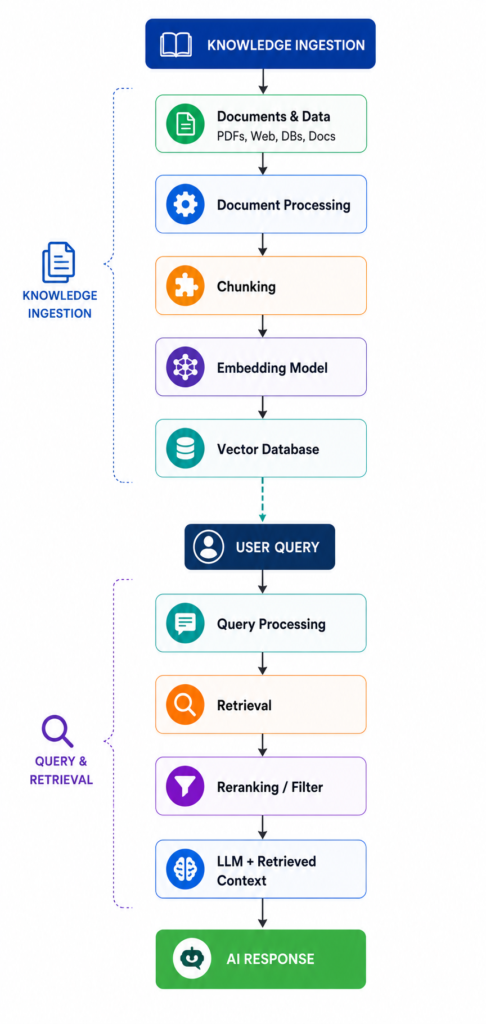
A typical RAG system contains two major stages:
Stage 1: Knowledge Ingestion
Source Documents → Processing → Chunking → Embeddings → Vector Database
Stage 2: Question Answering
User Query → Query Processing → Retrieval → Reranking → Context → LLM → Response
These two stages work together to create the complete RAG architecture.
RAG Architecture Diagram
Main Components of RAG Architecture
A RAG system typically consists of several interconnected components.
| Component | Primary Function |
| Data Sources | Provide business knowledge |
| Document Processor | Extract and prepare information |
| Chunking | Divide content into usable sections |
| Embedding Model | Convert text into vectors |
| Vector Database | Store and retrieve embeddings |
| Retriever | Find relevant information |
| Reranker | Improve retrieved-result relevance |
| LLM | Generate the final response |
| Application Layer | Deliver the AI experience |
| Monitoring | Track quality and system performance |
Each component affects the quality and reliability of the overall system.
1. Data Sources
Quick Answer
The first layer of a RAG architecture consists of the information the AI system needs to access.
Possible sources include:
- PDFs
- Word documents
- Websites
- Product documentation
- Knowledge bases
- Databases
- Internal wikis
- FAQs
- Technical manuals
- Customer-support documentation
- Policies
- Structured business data
The quality of the source information directly affects the quality of the resulting AI responses.
If outdated or incorrect information enters the knowledge base, the retrieval system may surface that information to the model.
2. Document Processing
Quick Answer
Before documents can be retrieved effectively, they usually need to be processed and transformed into a usable format.
Document processing may involve:
- Text extraction
- OCR
- Removing unnecessary formatting
- Metadata extraction
- Document classification
- Cleaning duplicated content
- Identifying document structure
For example, a PDF may contain headings, tables, images, footnotes, and multiple sections.
A RAG pipeline needs to process that information appropriately before creating searchable representations.
3. Chunking
Quick Answer
Chunking divides large documents into smaller pieces that can be retrieved independently.
For example:
Large Document
↓
Section 1
Section 2
Section 3
Section 4
↓
Smaller Searchable Chunks
The goal is to create chunks that contain enough context to be useful without becoming unnecessarily large.
Poor chunking can reduce retrieval quality.
Common Chunking Strategies
| Strategy | Description |
| Fixed-Length | Splits text according to a character/token limit |
| Sentence-Based | Groups complete sentences |
| Paragraph-Based | Uses paragraph boundaries |
| Semantic | Groups content based on meaning |
| Structure-Based | Uses headings and document structure |
The appropriate strategy depends on the source content.
Technical documentation, legal documents, product catalogs, and support articles may require different chunking approaches.
4. Embeddings
Quick Answer
Embeddings convert text into numerical representations that capture semantic relationships.
A simplified concept is:
Text → Embedding Model → Vector
For example, two questions with different wording but similar meaning can produce vectors that are relatively close in embedding space.
This allows a retrieval system to search based on semantic similarity, rather than relying only on exact keyword matches.
5. Vector Database
Quick Answer
A vector database stores embeddings and allows the system to retrieve information that is semantically relevant to a user’s query.
Common vector-storage technologies include:
- Pinecone
- Weaviate
- Milvus
- Qdrant
- pgvector
- Other vector-capable databases
A typical workflow is:
Document Chunk → Embedding → Vector Database
When the user asks a question:
User Query → Query Embedding → Similarity Search → Relevant Chunks
The vector database is therefore an important part of many RAG architectures.
6. Retrieval
Quick Answer
Retrieval is the process of finding information from the knowledge base that is relevant to the user’s question.
Suppose the user asks:
“What is the warranty period for our industrial laser machines?”
The retrieval system searches the available knowledge base and attempts to identify the most relevant documents or chunks.
The retrieved content is then passed to the generation layer.
7. Reranking
Quick Answer
Reranking can improve retrieval quality by evaluating the relevance of retrieved results and placing the most useful information higher in the final context.
A simplified pipeline is:
Query → Initial Retrieval → Candidate Results → Reranker → Best Results
This can be useful when the initial retrieval stage returns several potentially relevant documents but their relevance varies.
Reranking is not mandatory for every RAG system, but it can improve performance for more demanding applications.
8. Context Construction
Quick Answer
After retrieval, the system needs to construct the context that will be provided to the language model.
The context may include:
- Retrieved document chunks
- Document titles
- Metadata
- Source references
- User information where authorized
- Conversation history
- System instructions
The application then builds a prompt or model input containing the relevant context.
The objective is to give the model enough information to answer the question without unnecessarily filling its context window with irrelevant material.
9. Large Language Model
Quick Answer
The LLM receives the user’s question along with the retrieved context and generates the final response.
Conceptually:
Question + Retrieved Context → LLM → Answer
The LLM is responsible for transforming the retrieved information into a natural-language response.
However, retrieval quality remains critical.
A powerful LLM cannot reliably answer a question using information that the retrieval layer failed to provide.
10. Application Layer
Quick Answer
The application layer connects the RAG system to the user experience.
It can include:
- Website chat
- Internal employee assistant
- Customer-support application
- Mobile application
- Enterprise search
- CRM interface
- API
- Internal knowledge portal
This is where users interact with the RAG-powered system.
RAG Workflow Step by Step
Step 1: Collect Business Data
Gather relevant information from approved sources.
Step 2: Process Documents
Extract and clean the information.
Step 3: Split Documents
Break documents into meaningful chunks.
Step 4: Generate Embeddings
Convert chunks into vector representations.
Step 5: Store Vectors
Store embeddings and metadata in a vector database.
Step 6: Receive User Query
The user asks a question through the application.
Step 7: Retrieve Relevant Information
The system searches the knowledge base.
Step 8: Rerank Results
The system can evaluate and prioritize the most relevant results.
Step 9: Build Context
Relevant information is passed to the LLM.
Step 10: Generate Response
The LLM generates an answer based on the provided context.
Step 11: Return Result
The application displays the response to the user.
RAG vs Fine-Tuning
Quick Answer
RAG and fine-tuning solve different problems.
RAG is primarily useful when a model needs access to external or changing information.
Fine-tuning changes model behavior by training it further on specialized examples.
| Factor | RAG | Fine-Tuning |
| External Knowledge | Strong | Not the primary purpose |
| Frequently Changing Data | Well suited | Less convenient |
| Company Documents | Strong use case | Not always necessary |
| Model Behavior | Limited | Stronger customization |
| Knowledge Updates | Update knowledge base | May require additional training |
| Citations | Can be supported | Not inherently provided |
| Implementation | Retrieval infrastructure required | Training infrastructure required |
| Best Use | Knowledge access | Behavior/style/task specialization |
In some advanced systems, RAG and fine-tuning can be used together.
RAG vs Traditional LLM
| Capability | Traditional LLM | RAG System |
| General Knowledge | Yes | Yes |
| Private Business Data | Limited without integration | Stronger |
| Current Internal Information | Limited | Can retrieve updated data |
| Knowledge Base Search | No native guarantee | Core capability |
| Source Attribution | Not inherent | Can be implemented |
| External Documents | Limited | Strong |
| Domain-Specific Answers | Depends on model | Can use retrieved context |
RAG does not automatically guarantee factual accuracy.
The retrieval pipeline, source quality, prompt design, model behavior, and application controls all influence the final result.
Where Is RAG Used?
Enterprise Knowledge Assistants
Employees can ask questions about internal:
- Policies
- Procedures
- Documentation
- Training material
- Product information
Customer Support
RAG can retrieve information from:
- Product manuals
- FAQs
- Support documentation
- Troubleshooting guides
- Policies
E-Commerce
A RAG system can retrieve:
- Product specifications
- Availability information
- Product documentation
- Shipping policies
Legal and Compliance
Organizations can build systems that search approved legal or regulatory documents.
These systems still require appropriate validation and human oversight for consequential decisions.
Technical Support
Engineers can search large technical documentation libraries using natural language.
Common RAG Architecture Challenges
Quick Answer
Building a RAG system is not simply a matter of connecting an LLM to a vector database.
Several factors affect performance.
Poor Document Quality
Incorrect or outdated documents can lead to poor responses.
Poor Chunking
If information is divided incorrectly, the retriever may not find the necessary context.
Weak Retrieval
The system may retrieve information that is semantically similar but not actually useful.
Too Much Context
Providing excessive irrelevant information can make generation less effective.
Missing Context
Retrieving too little information can leave the model unable to answer the question.
Outdated Knowledge
A RAG system is only as current as its connected knowledge sources.
Access Control
Enterprise RAG systems need to ensure users only retrieve information they are authorized to access.
How to Improve RAG Performance
Improve Document Quality
Start with reliable, current, and well-structured source information.
Optimize Chunking
Use chunk sizes and boundaries appropriate to the document type.
Add Metadata
Metadata can include:
- Document type
- Department
- Date
- Product
- Author
- Access level
This can improve filtering and retrieval.
Use Hybrid Search
Some systems combine semantic vector search with traditional keyword search.
This can help when exact terminology, product codes, technical identifiers, or names matter.
Add Reranking
Reranking can improve the ordering of retrieved information.
Evaluate Retrieval Separately
Do not evaluate only the final answer.
Measure:
Retrieval Quality + Generation Quality
Separately.
Monitor the System
Track:
- Retrieval accuracy
- Response quality
- Latency
- Failed queries
- User feedback
- Source usage
RAG Architecture for Enterprise AI
Enterprise RAG systems often require additional layers beyond a basic prototype.
A more complete architecture may include:
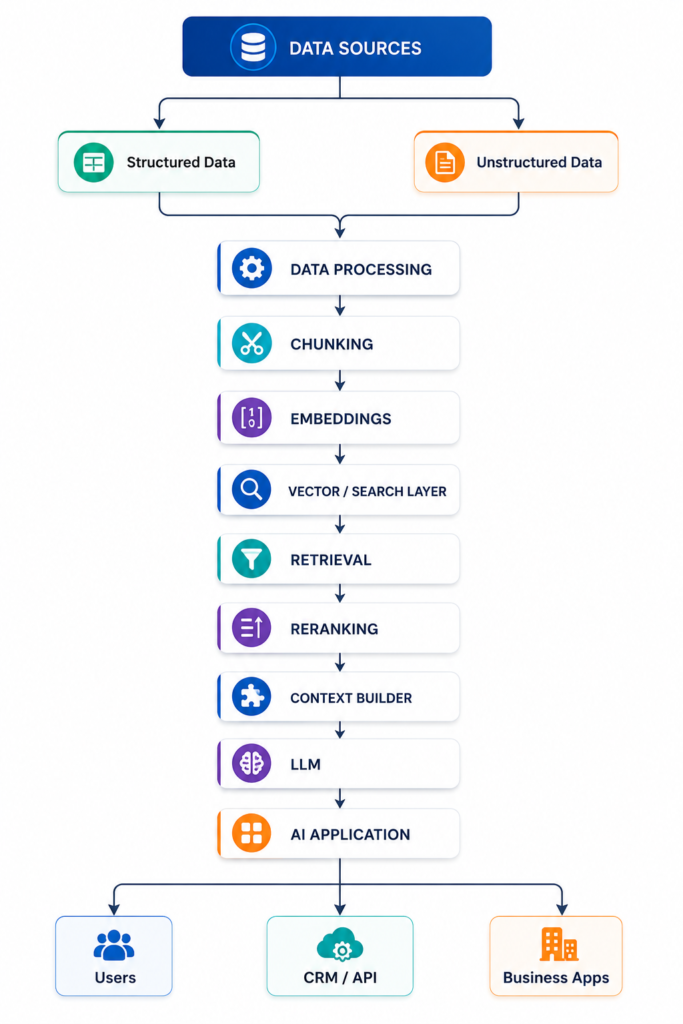
Enterprise implementations may additionally require:
- Authentication
- Authorization
- Observability
- Logging
- Evaluation
- Guardrails
- Data governance
- Human escalation
RAG and AI Agents
RAG and AI agents can work together.
An AI agent may use RAG as one of its tools.
For example:
User → AI Agent → RAG Search → Retrieve Policy → Agent → CRM Action
The RAG system provides knowledge.
The agent uses that knowledge as part of a larger workflow.
This creates a powerful architecture for enterprise automation.
Why Businesses Should Consider RAG
RAG can be valuable when a business has:
- Large amounts of internal documentation
- Frequently changing information
- Specialized knowledge
- Customer-support documentation
- Product information
- Internal processes
- Multiple knowledge sources
Instead of asking employees or customers to manually search through hundreds or thousands of documents, a RAG-powered interface can provide a natural-language access layer.
How ProdCrowd Can Help
Quick Answer
ProdCrowd can help businesses evaluate and implement AI architectures based on their specific data, workflows, and automation requirements.
A RAG implementation strategy can include:
Business Requirement → Data Assessment → RAG Architecture → Knowledge Pipeline → Retrieval → LLM Integration → Testing → Deployment → Monitoring
Potential applications include:
- Enterprise knowledge assistants
- AI customer support
- Internal AI search
- Technical documentation assistants
- Product knowledge systems
- AI-powered research
- Custom GPT solutions
- AI agents with RAG
- Enterprise AI automation
The goal is not simply to add an LLM to business data.
The goal is to build an AI system that can retrieve the right information, use it appropriately, and deliver measurable business value.
Looking to build a RAG-powered AI solution for your business? ProdCrowd can help design an architecture around your data, applications, and business workflows.
Frequently Asked Questions
What is RAG architecture?
RAG architecture is a system design that combines information retrieval with large language model generation. It retrieves relevant external information and provides it to the LLM as context for generating an answer.
What are the main components of RAG?
The main components commonly include data sources, document processing, chunking, embeddings, a vector or search database, retrieval, optional reranking, context construction, an LLM, and an application layer.
Why use a vector database in RAG?
A vector database can store embeddings and support similarity-based retrieval, allowing the system to find information that is semantically related to a user’s query.
Is RAG better than fine-tuning?
Neither approach is universally better. RAG is particularly useful for accessing external or changing knowledge, while fine-tuning is generally used to modify model behavior or specialize performance for particular tasks.
Can RAG reduce AI hallucinations?
RAG can provide the model with relevant source information and can reduce some types of unsupported responses, but it does not eliminate hallucinations. Retrieval quality and model behavior still need to be evaluated.
Can RAG use company data?
Yes. RAG systems can be designed to retrieve information from approved company documents, databases, knowledge bases, websites, and other business data sources.
Can RAG work with AI agents?
Yes. RAG can function as a knowledge-retrieval tool within an AI agent workflow, allowing the agent to retrieve relevant information before taking an action.
Conclusion
RAG architecture provides a practical way to connect large language models with external business knowledge.
Instead of relying exclusively on what an AI model already knows, a RAG system retrieves relevant information from a connected knowledge base and provides that information to the model during the generation process.
The core architecture can be summarized as:
Data → Processing → Chunking → Embeddings → Vector Database → Retrieval → Context → LLM → Response
For businesses, this architecture can support applications ranging from internal knowledge assistants and customer support to technical documentation, enterprise search, and AI agents.
However, successful RAG implementation requires more than selecting a vector database and an LLM.
Document quality, chunking, retrieval, metadata, access control, evaluation, monitoring, and application design all matter.
When these components are designed together, RAG can become an important foundation for building AI systems that can work with an organization’s own knowledge.